
I cannot get my Apple Watch to connect to the FORME appUpdated 8 months ago
If you're having trouble getting your Apple Watch to connect to the FOMRE app during initial setup, please view the following:
- Ensure you have a compatible device from the list seen below to ensure proper FORME integration:
Apple Watch with watchOS 8 or late
Running FORME Member App on iPhone 6s or later with iOS 15 or later
Apple Watch Series 3
Apple Watch Series 4
Apple Watch Series 5
Apple Watch SE
Apple Watch Series 6
Apple Watch Series 7 - Confirm proper installation of both the FORME app on your iPhone as well as on the Apple Watch
2a. Download the FORME app on the iOS app store
2b. Locate & Install the FORME app onto the Apple Watch via the Apple Watch app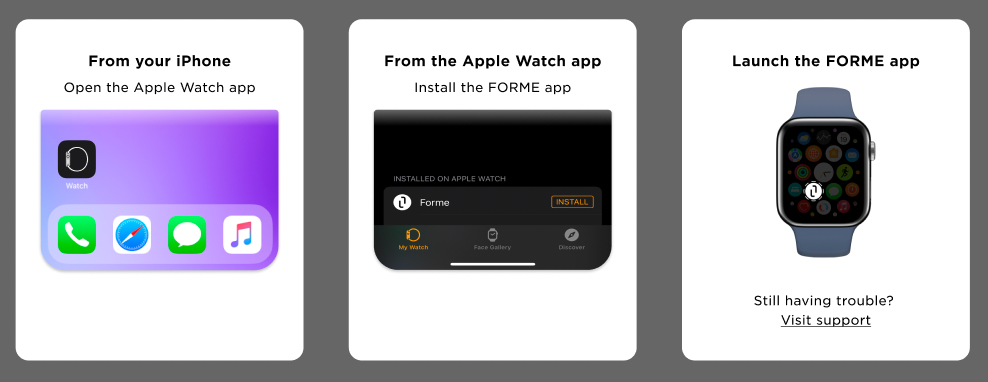
- Ensure all included devices are running on the most up to date version:
FORME app
Apple Watch app
Apple Watch
iPhone / iPad
Need Help?
If you've tried / confirmed all the above steps and are still experiencing trouble, please reach out to our Member Support team at [email protected] and we'll be happy to help.